It is not possible to register for Workstaff by yourself at this time. To log in to Workstaff, you must first have been invited by an employer who uses the app to manage their team.
I Can't Connect to Workstaff
Sometimes you may have difficulties logging in to the mobile app. In most cases, we have observed that this is usually due to one of the following reasons:
- Your employer has not yet created an account for you.
- Your contact information may not be correct in the profile created by your employer.
- The contact information you entered during login may not match the information your employer used to create your account.
Possible Solutions
When entering your contact information to log in, be sure to type it yourself rather than copying and pasting it.
If you are unable to log in, contact your employer to ensure that they have created a profile for you and that your contact information is correct.
I'm being asked for a password / I do not remember my password
Workers do not need a password to sign in. If the login page asks for an email address and password:
- Tap Sign in without password.
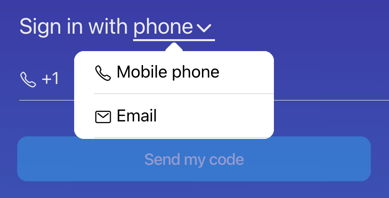
- Choose whether to sign in with your email address or mobile phone number.
- Enter the same email address or phone number your employer used to create your profile.
- Tap Send my code.
- Enter the 6-digit code you receive by email or text message.
I can't use my phone number to sign in
Workstaff supports phone sign-in with international mobile numbers. Select the correct country or region when entering your number. Workstaff will send you a 6-digit sign-in code by text message.
If you do not have a mobile phone or text messages cannot be delivered to your number, ask your employer to add your email address to your profile. On the login page, select Email from the sign-in method menu and enter that address:
I'm not receiving the sign in code
When Workstaff sends you the login code by email or text message, please be patient. It can happen that there is a delay in receiving the text message or email. There is no point in sending you back a code after only a few seconds.
The login code can only be used once and is only valid for a limited time. If you send a new code to yourself, any code previously sent will no longer be valid. So make sure you always use the most recent login code.